1 home for your work. 1 Cockpit for your agents.

brainplane runs Claude Code, Codex and your other agent CLIs in real terminals, in workspaces and worktrees, with 1 brain per topic behind every session. What needs you lands in 1 Inbox. At Full control, the guard still holds: Claude Code asks you before a send, Codex's sends are refused, and neither can pay, delete outside its workspace or deploy.

14 days free with every feature. No card. Works with the plans you already have: Claude, ChatGPT, Gemini, Grok, Cursor, Copilot and more. brainplane sells no AI subscription.

Watch the film

The film, 15 seconds

You became the clipboard.

Sound on. Captions in the player. Watch the full film, 58 seconds. Some lines say more than the app does today; the full film's transcript notes what it does.

The problem

Your agents got faster. You became the slow part. Claude Code drafts, Codex reviews, Grok searches, and each one starts cold.

So you paste the context, repeat the decision and carry the answer back. You became the clipboard between them. brainplane is the brain they share.

New in 0.4.0

The Cockpit. Where your agents run.

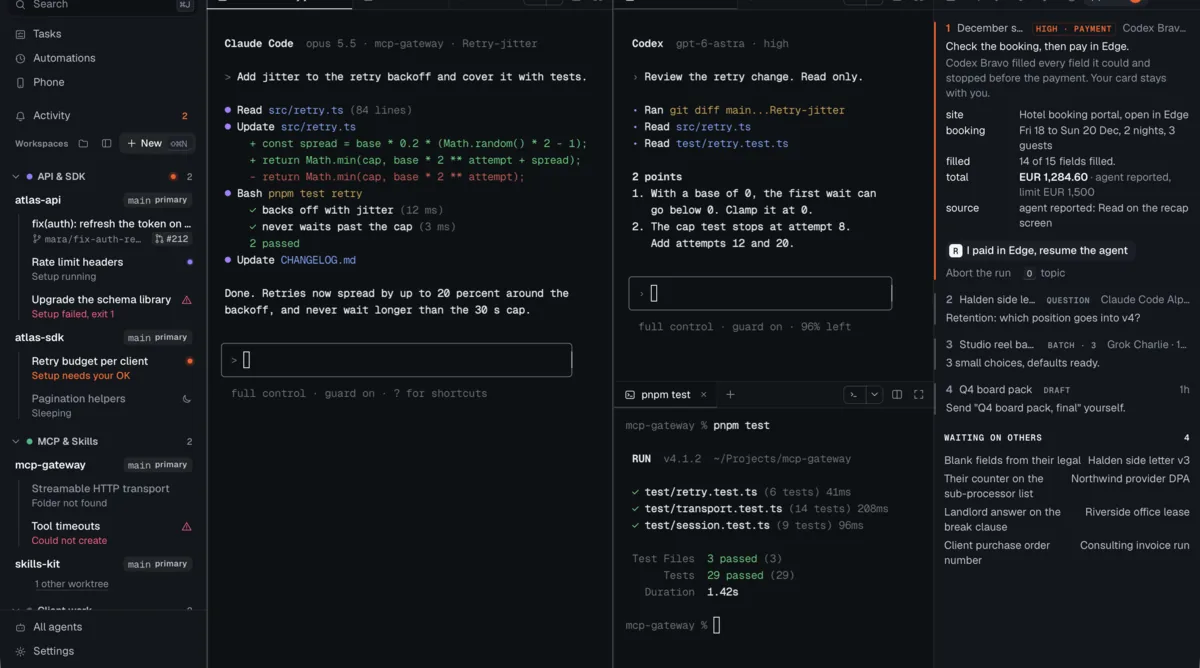
Every agent session in 1 window: real terminals in tabs and splits, the workspaces they work in, and You, the queue of what needs you. It shares brainplane's brain: each session belongs to a topic, each question reaches the Inbox, and each answer you give leaves a receipt.

The brainplane Cockpit with demo data: workspaces in the sidebar with each agent's state, Claude Code adding jitter to a retry backoff in a real terminal, Codex reviewing the change in a split, 29 tests passing below, and You on the right with 4 cards that need you, a payment first.
  • WorkspacesRepos, worktrees and topic folders, each agent under its own with its state.
  • TerminalsReal ones, fed by brainplane-ptyd, in tabs and splits.
  • YouWhat needs you, most urgent first: the same cards as the Inbox.

The screen of brainplane 0.4.0 with demo data. The terminals are real; the agents in them are stand-ins that print a fictional session.

Show a part of the Cockpit
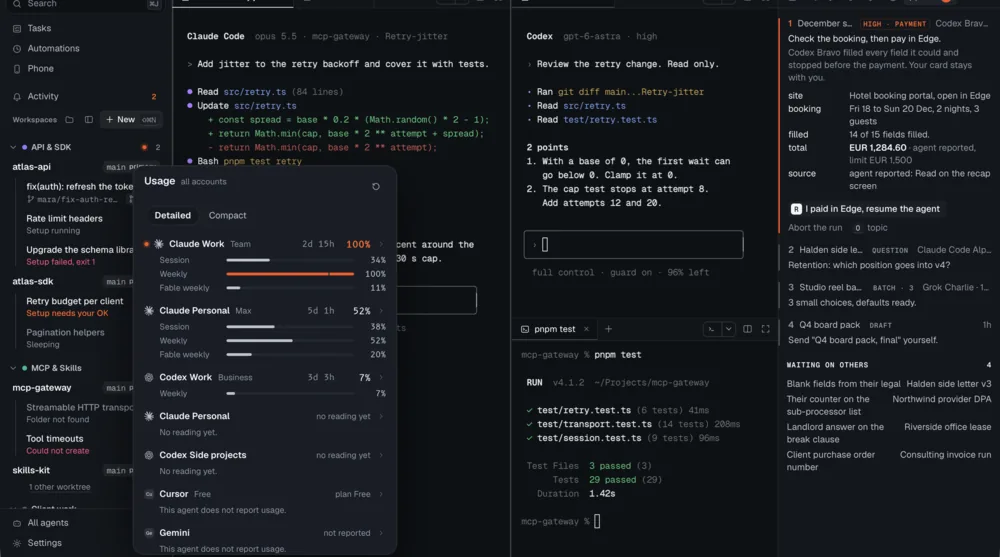
The Usage popover over the Cockpit: Claude Work at 100 percent of its weekly window with 2 days 15 hours to reset, Claude Personal at 52 percent, Codex Work at 7 percent, and Cursor and Gemini rows that say they do not report usage.

Usage, and 1 press to continue.

See the usage of every Claude Code and Codex account, worst first, from their own sources. When an account hits its limit, Continue moves the waiting work to Codex with the topic pack, and the session picks up after the reset.

Read the docs
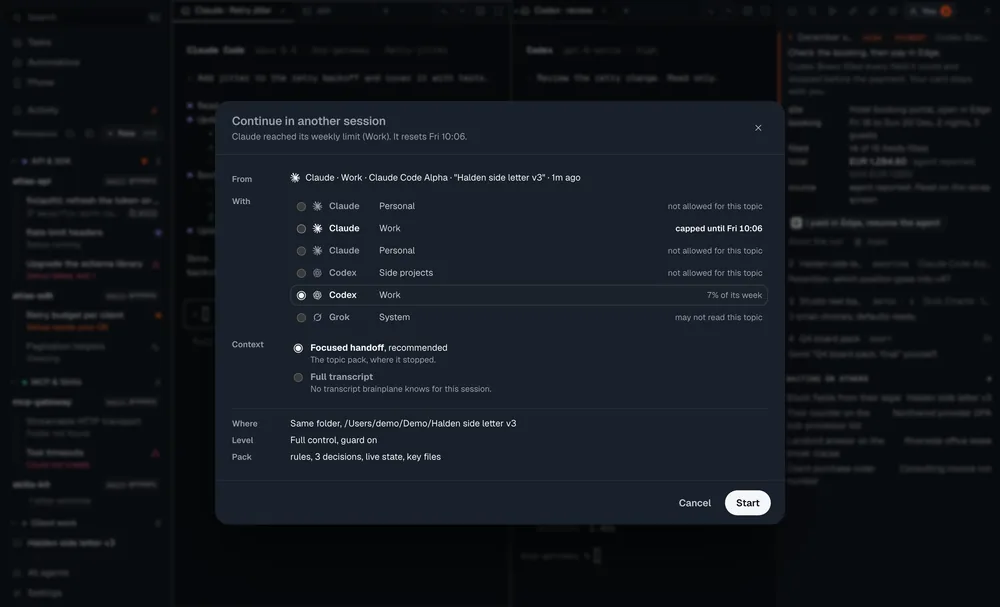
Continue in another session: Claude reached its weekly limit. Codex Work is picked, a focused handoff with the topic pack is recommended, in the same folder at Full control with the guard on.

Continue in another agent.

A capped session offers the next account the topic allows. The handoff carries the topic pack and where the work stopped, at the same level, with the guard on.

Read the docs
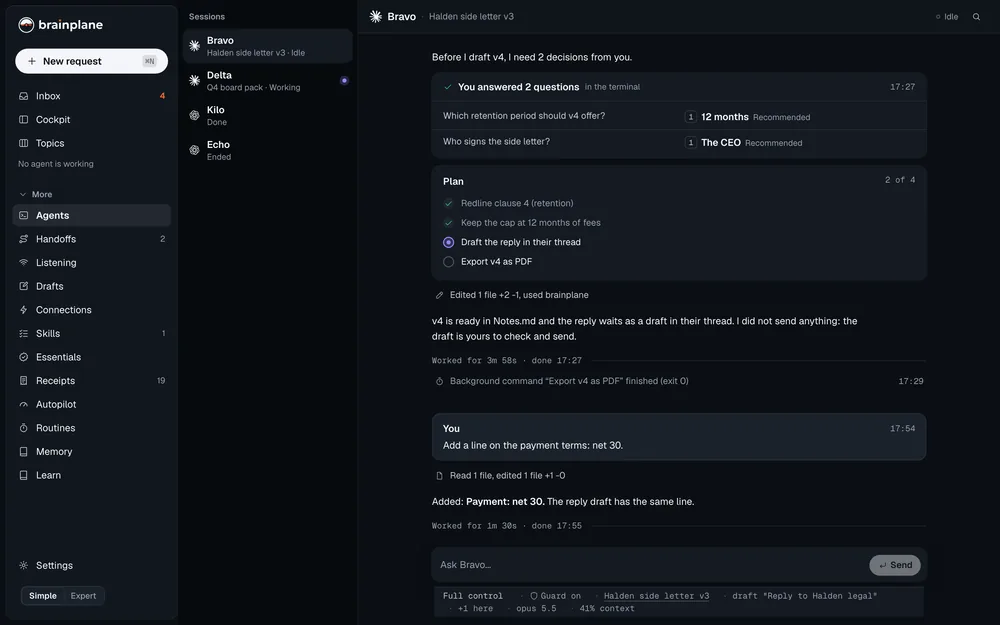
The chat view of Bravo on the Halden side letter: 2 questions answered in the terminal, a plan at 2 of 4, the note that the reply waits as a draft, and a footer with Full control, Guard on and 41 percent context.

A chat view of each session.

Read a Claude Code or Codex session as a conversation: its words, 1 line per batch of tools, the answers you gave. The composer types into the terminal only when the agent is the program in front.

Read the docs
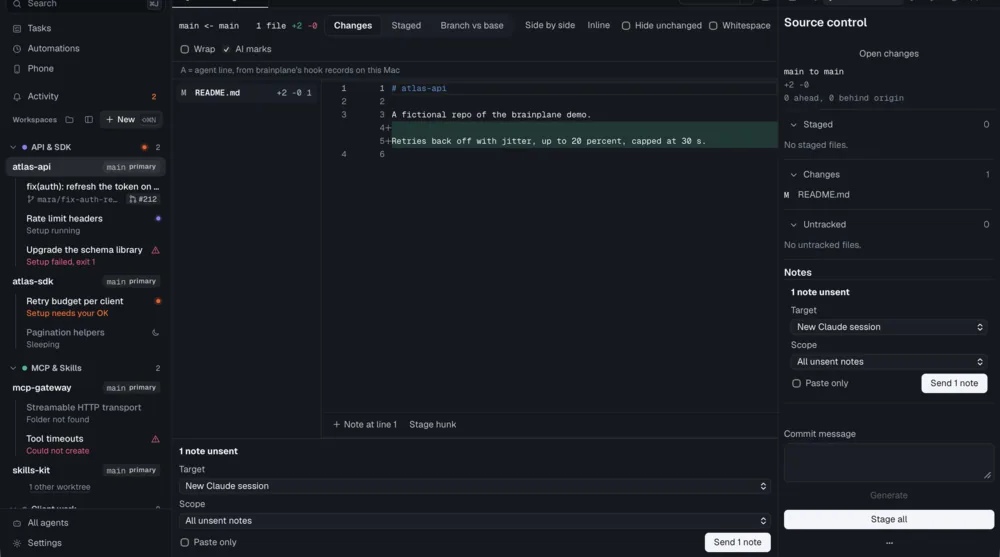
A diff of README.md in the fictional atlas-api repo with 2 lines added, a note saved on the file, and Source control on the right with 1 note unsent and a Send 1 note button.

Review and diffs.

Read the diff of a workspace side by side or inline. Leave a note on a line and send your notes to the agent. Stage, commit, open the pull request and read its checks from the same panel.

Read the docs
The Files panel of the atlas-api workspace and README.md open in a tab with its Markdown preview.

Files and viewers.

A file tree and an editor, with Markdown, PDF, images, CSV, Word and HTML previews. In a topic folder, a save keeps the old version in _old/ first.

Read the docs
A new browser tab in the Cockpit: 3 dev servers of the workspace, recent pages of the fictional Lumen Studio app, the Design button in the address bar and the shortcut for Design Mode.

A browser with Design Mode.

Each workspace gets a browser with its own profile, its dev servers 1 click away. Design Mode picks elements on the page and sends them to an agent. Agents do their own browsing in browser lanes you can watch.

Read the docs
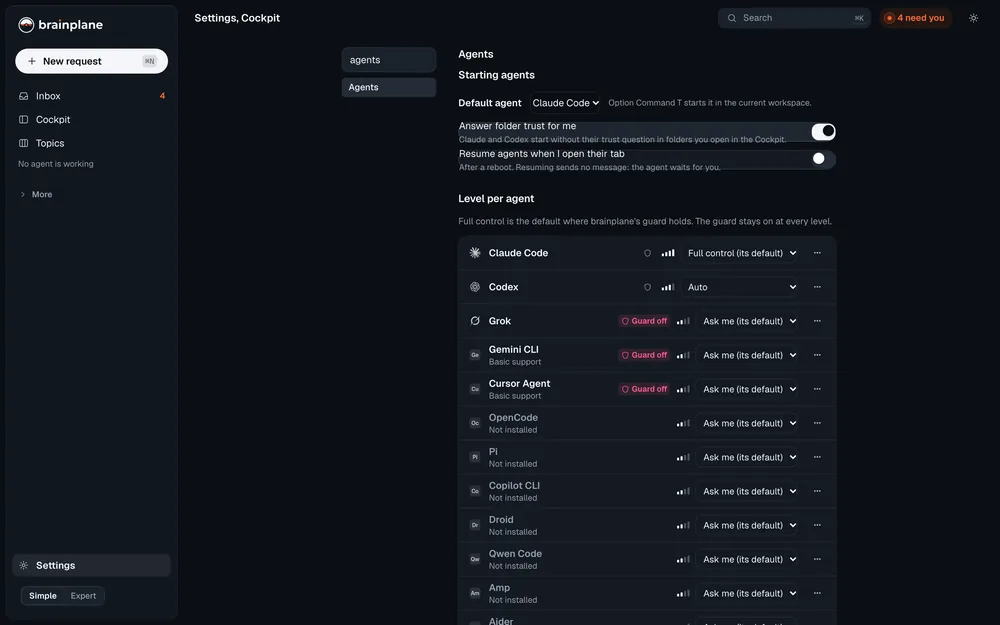
Settings, Agents in the Cockpit: Claude Code at Full control, its default, Codex at Auto, and Grok, Gemini CLI and Cursor Agent at Ask me with a Guard off label. Above, the switch that answers folder trust for Claude and Codex.

Full control, with the guard on.

Claude Code and Codex start at Full control, their folder trust answered for you. brainplane's guard still holds: Claude Code asks you before a send, Codex's sends are refused, and neither can pay, delete outside its workspace or deploy. Agents with no proven guard start at Ask me and say Guard off. An agent at Full control runs as you: the guard is no sandbox.

Read the docs
The jump palette with the word atlas: the matching places, the workspaces of the fictional atlas-api and atlas-sdk repos with their branches, and an open pull request.

1 palette for everything.

Command J finds what needs you, tabs, agents, files and past sessions. Session History searches Claude Code and Codex transcripts, indexed on your Mac.

Read the docs

Everything in the Cockpit

The Cockpit has a brain behind it.

An agent IDE runs your agents. brainplane also remembers for them, asks you less often, and keeps your hands on the controls.

  1. 1 brain per topic

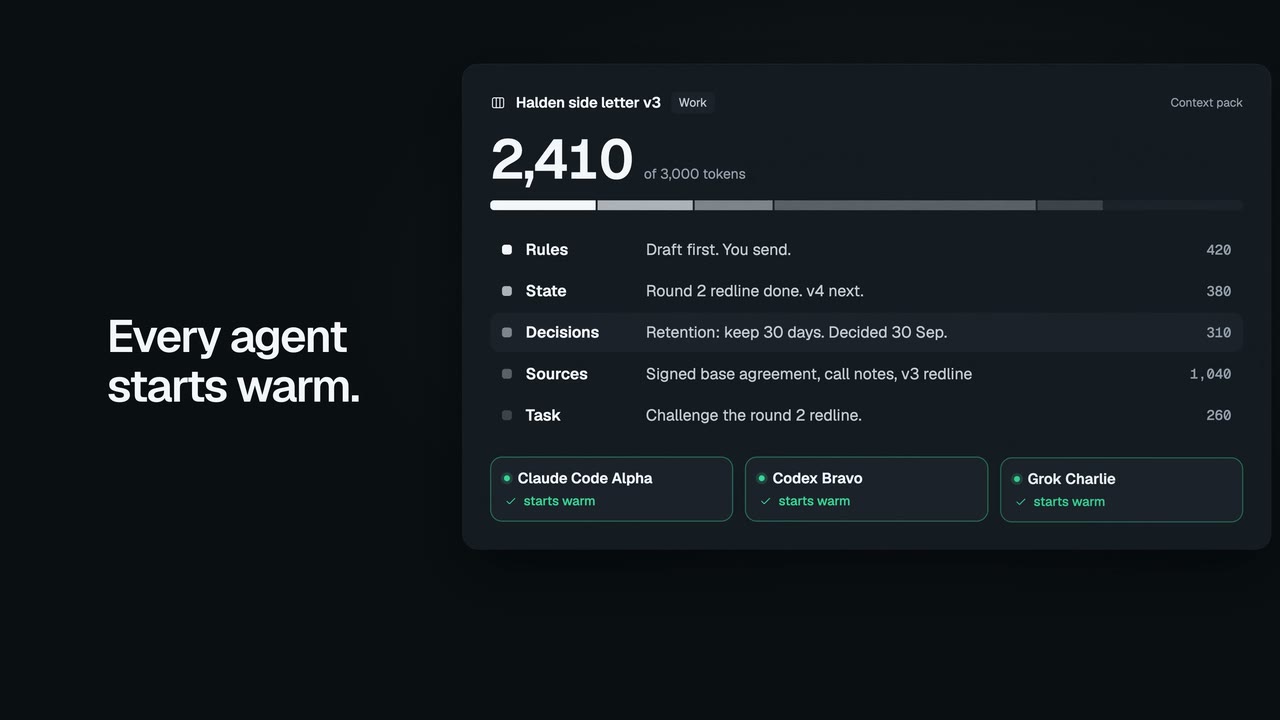
    Each session belongs to a topic. Its pack carries the goal, where things stand and what you decided, so the next agent starts warm.

  2. 1 Inbox

    Questions, stops and finished work from every agent arrive as cards, most urgent first, 1 key to answer.

  3. Receipts and undo

    Every answer holds 2 s so you can take it back, then leaves a receipt. Steps that can be reversed keep an Undo.

  4. The guard

    At every level, Full control included: Claude Code asks you before a send, Codex's sends are refused, and neither can pay, delete outside its workspace or deploy.

  5. Voice

    Call an agent by its name and ask out loud. Speech can run on your Mac.

How it works

3 steps. Then 1 team.

  1. 01

    Connect your agents.

    brainplane finds the agent CLIs on your Mac and connects them on your press, with the exact change and a backup first. Each agent keeps your login and your plan.

  2. 02

    Give each topic 1 brain.

    A deal, a repo or a trip gets its goal, where it stands, settled decisions and key files. A Claude Code session on the topic starts with its pack of about 3,000 tokens at most. Codex, Grok and the others get it in a handoff or read it through brainplane's MCP tools.

  3. 03

    Answer what needs you.

    Questions, stops and finished work arrive as cards in 1 Inbox, high risk first. 1 key answers. Every answer holds 2 s so you can take it back, then leaves a receipt.

In the app today

What 1 team looks like.

Screens from brainplane 0.3.5 and 0.3.9 with invented data. Under each one, where its test ran.

Second opinion

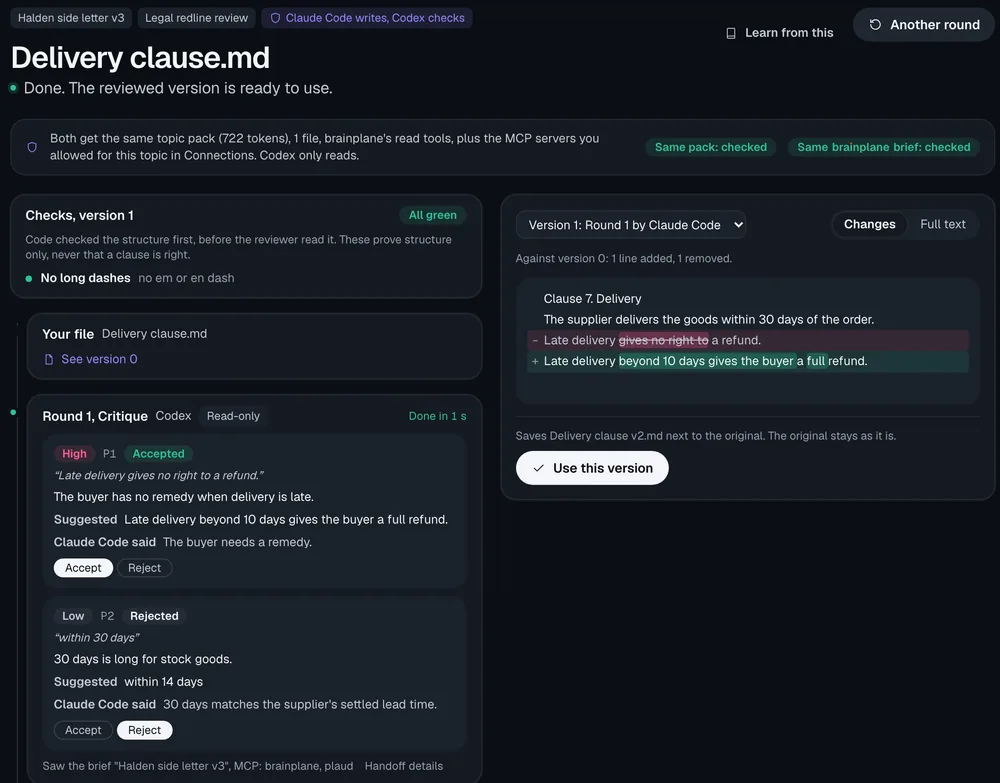
Claude Code drafts. Codex critiques. Claude Code decides.

Start a review on a topic file. Codex reads the draft and lists its points. Claude Code accepts or rejects each one, with its reason. You read the diff and press Use this version: a v2 lands next to the original, with tracked changes in a Word file.

  • 2 model families on 1 document
  • Codex only reads. Your original stays as it is

Passed on the signed 0.3.5 with real Claude Code and Codex on a real Mac.
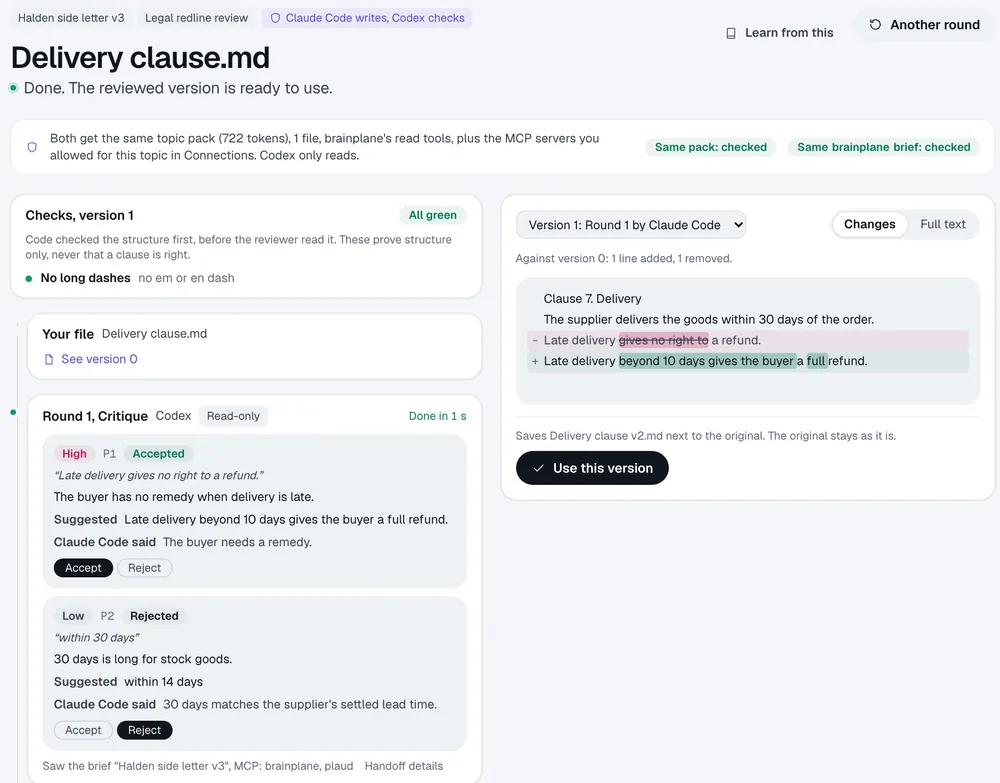
A finished review of Delivery clause.md. Codex's critique in round 1: a high point accepted by Claude Code and a low point rejected with its reason. On the right, the diff: late delivery beyond 10 days gives the buyer a full refund, and a Use this version button.A finished review of Delivery clause.md. Codex's critique in round 1: a high point accepted by Claude Code and a low point rejected with its reason. On the right, the diff: late delivery beyond 10 days gives the buyer a full refund, and a Use this version button.

Memory and Recall

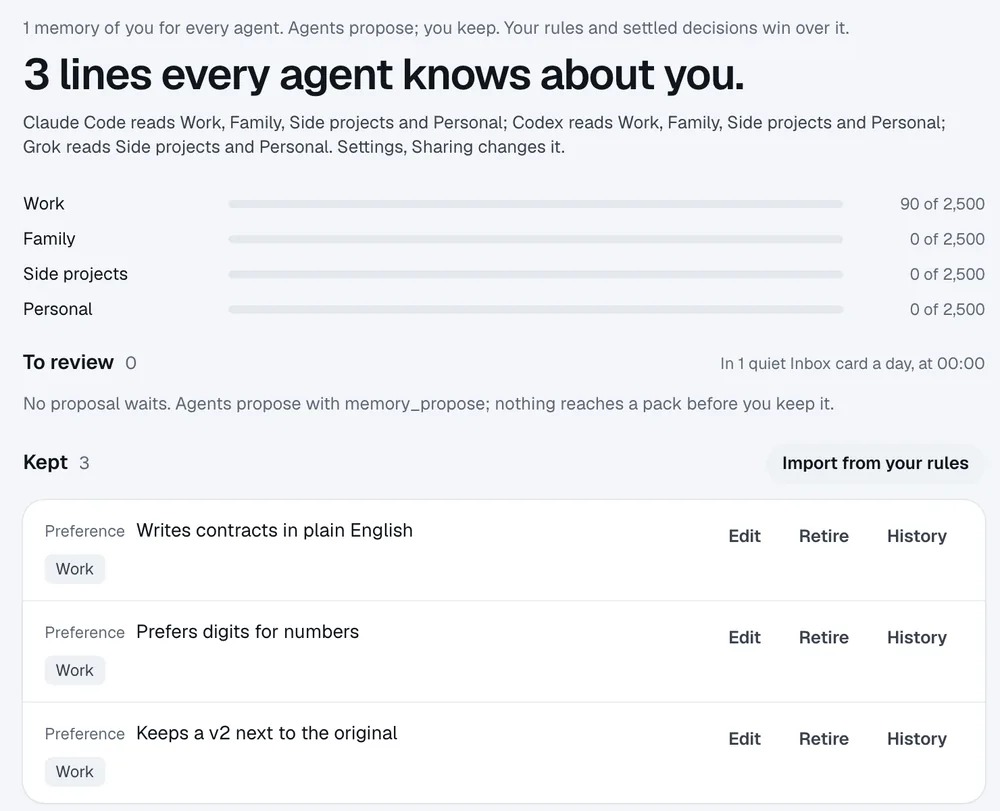
1 memory of you, for every agent.

Agents propose lines about how you work, and nothing reaches a pack before you keep it. Kept lines reach each agent in its About you block, in the scopes you chose. Start from the rules files you already wrote. With Recall, an agent can search your past work through brainplane's MCP tools.

  • Your rules and settled decisions win over it
  • Every line shows its scope, with Edit, Retire and History

Passed on the signed 0.3.5 on a real Mac: a real Codex session quoted a kept line and found a past record.

The Memory page: 3 lines every agent knows about you. Which scopes Claude Code, Codex and Grok read, a usage bar per scope, and 3 kept preferences such as Writes contracts in plain English.The Memory page: 3 lines every agent knows about you. Which scopes Claude Code, Codex and Grok read, a usage bar per scope, and 3 kept preferences such as Writes contracts in plain English.

Connections

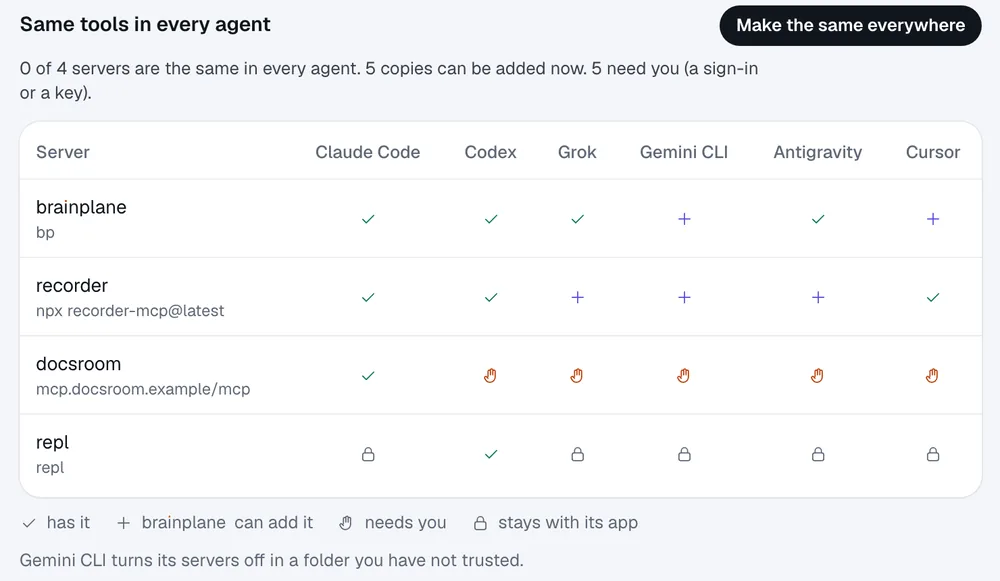
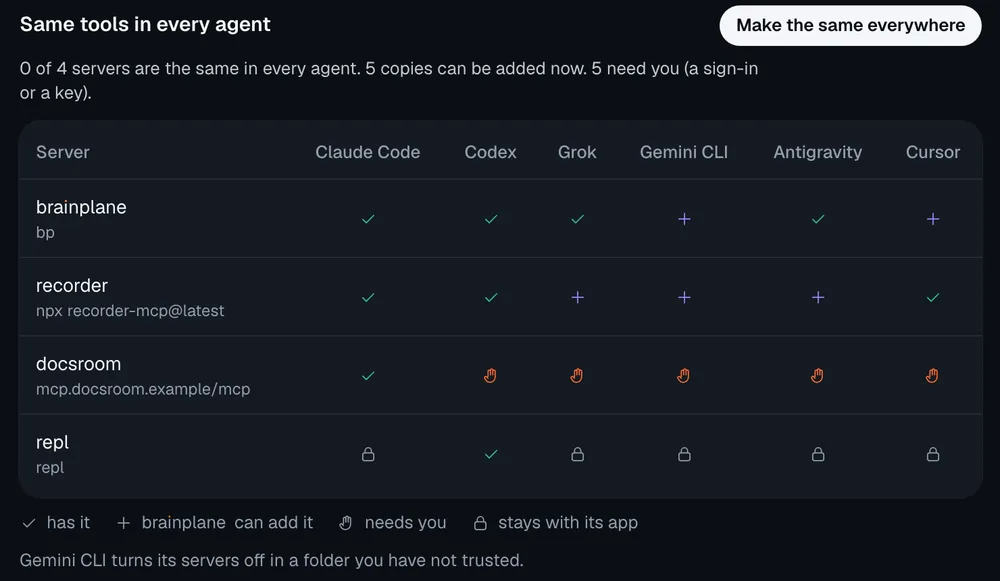
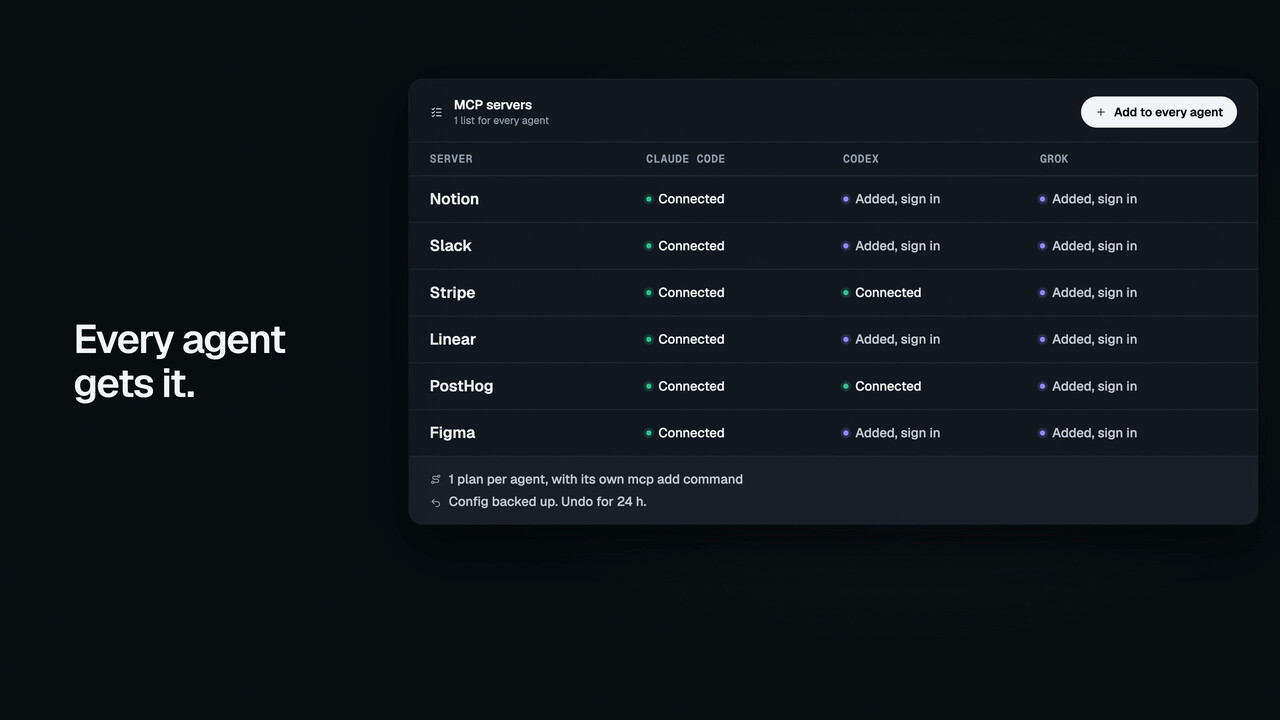
Your agents' MCP servers, in 1 matrix.

See which MCP servers Claude Code, Codex, Grok, Gemini CLI, Antigravity and Cursor each have. Make the same everywhere adds the copies that need no sign-in or key, with each agent's own command and a backup first. The ones that need a sign-in or a key stay with you, with the exact line to run.

  • Every other server stays byte for byte
  • Undo puts the files back

Tested on a real Mac: 5 copies added, each listed by the agent's own list command. A tool call through a copied server is not tested yet.

Same tools in every agent: a matrix of 4 MCP servers across Claude Code, Codex, Grok, Gemini CLI, Antigravity and Cursor, with has it, brainplane can add it, needs you and stays with its app, and a Make the same everywhere button.Same tools in every agent: a matrix of 4 MCP servers across Claude Code, Codex, Grok, Gemini CLI, Antigravity and Cursor, with has it, brainplane can add it, needs you and stays with its app, and a Make the same everywhere button.

The Inbox

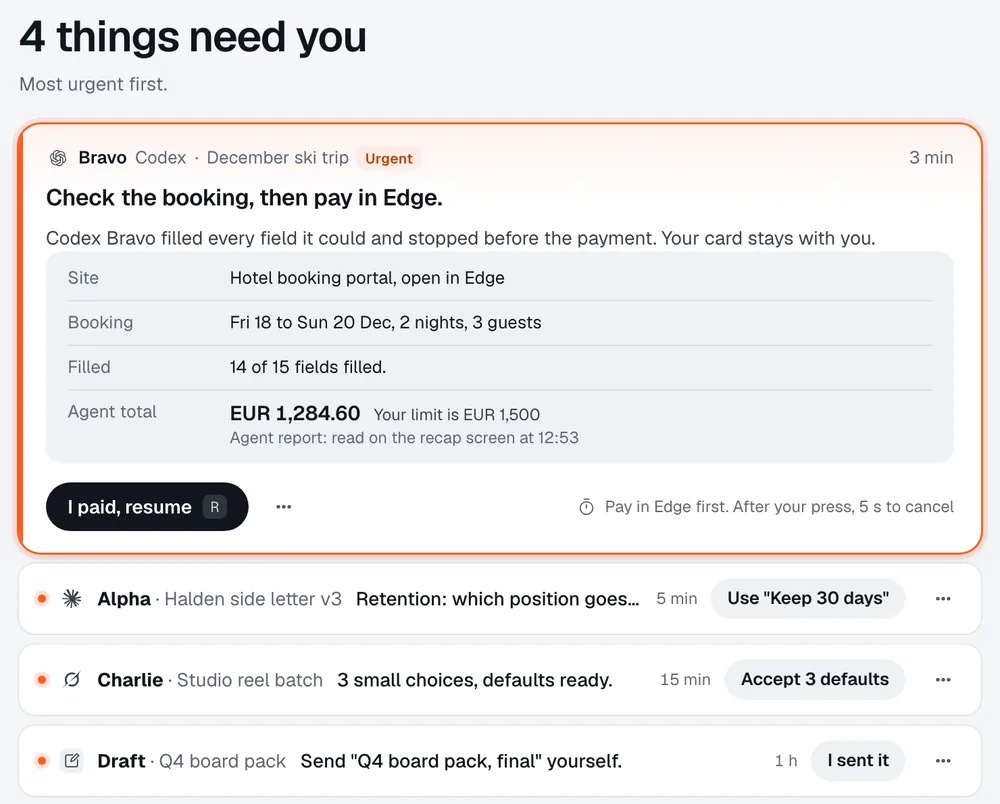
1 true number. The most urgent card open.

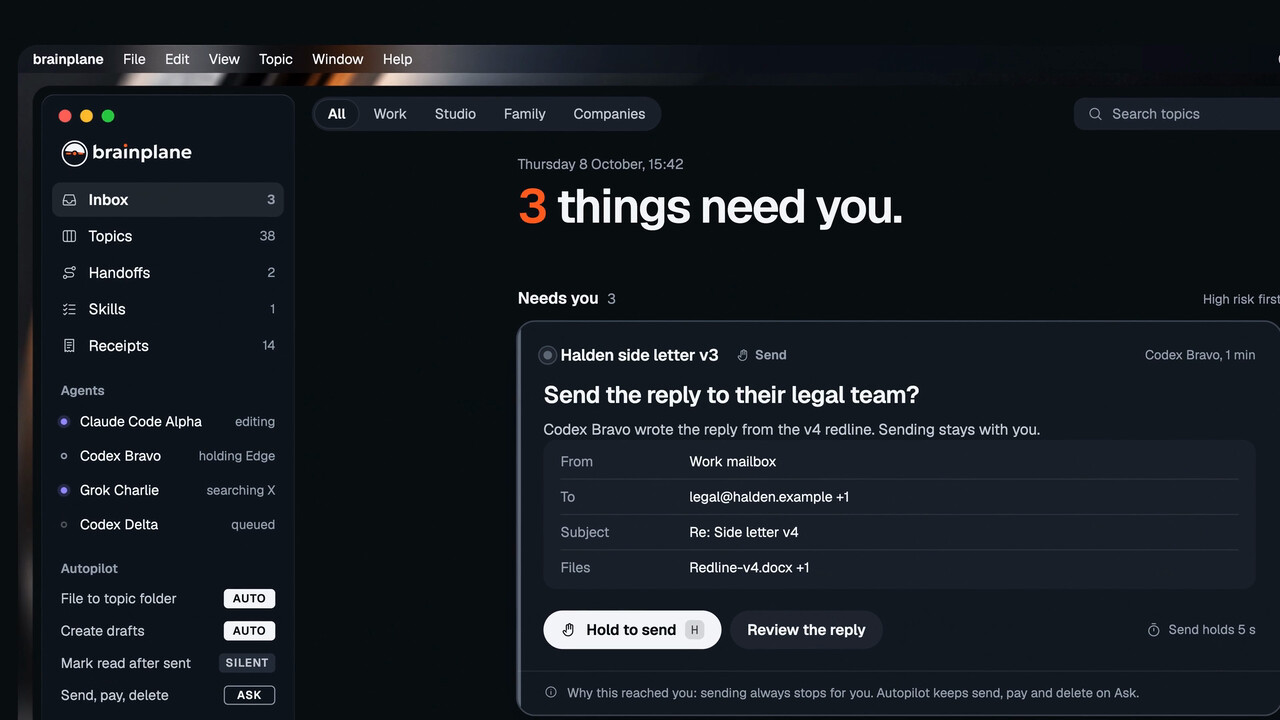
The Inbox counts what needs you, most urgent first. The open card says which agent asks, on which topic, and what it wants in 1 line, with 1 button. Every other card is 1 row with its own button. When an agent reaches a payment, a send, a delete or a deploy, it stops there and the card waits for you. A Claude Code session waiting in iTerm2 gets your answer typed in. Asks from Slack land the same way, as cards with a draft reply.

  • Urgent first, 5 s to cancel
  • The Slack watcher has no send tool

The 0.3.9 Inbox passed its end to end journeys on invented data. Live answers tested with a real Claude Code in iTerm2; Codex and Grok with stand-ins. Slack tested on a real workspace.

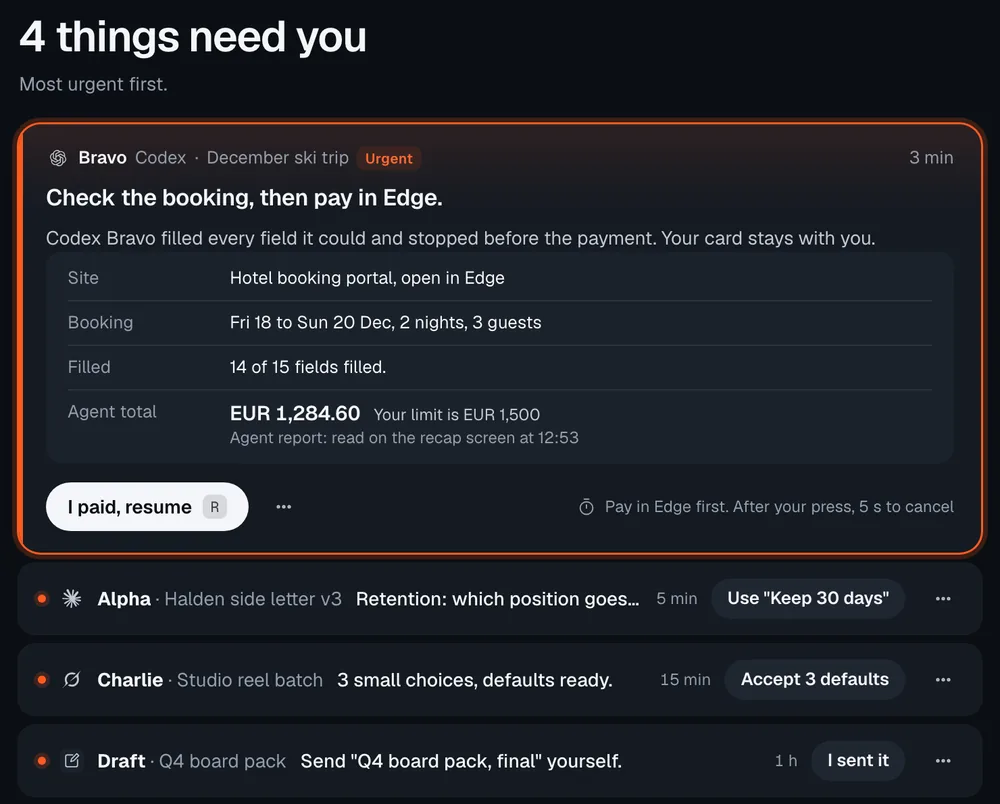
The brainplane Inbox: 4 things need you, most urgent first. The open card, marked Urgent: Bravo, a Codex session on the December ski trip, asks you to check the booking, then pay in Edge. It filled 14 of 15 fields, the agent total is EUR 1,284.60 with a limit of EUR 1,500, and the button reads I paid, resume. Below, 1 row for each other card, with its own button such as Use Keep 30 days.The brainplane Inbox: 4 things need you, most urgent first. The open card, marked Urgent: Bravo, a Codex session on the December ski trip, asks you to check the booking, then pay in Edge. It filled 14 of 15 fields, the agent total is EUR 1,284.60 with a limit of EUR 1,500, and the button reads I paid, resume. Below, 1 row for each other card, with its own button such as Use Keep 30 days.

Who it is for

For people who run more than 1 agent.

  • You run 2 or more agent CLIs.Claude Code, Codex, Grok, Gemini CLI or Cursor, side by side, most days.
  • Your work lives in folders.A repo, and also contracts, finance and operations in the folders on your Mac.
  • You keep the last word.brainplane never sends, pays, deletes or deploys on its own. When an agent stops at 1 of those steps, the card waits for you.

Simple and Expert

Calm by default. Dense when you want it.

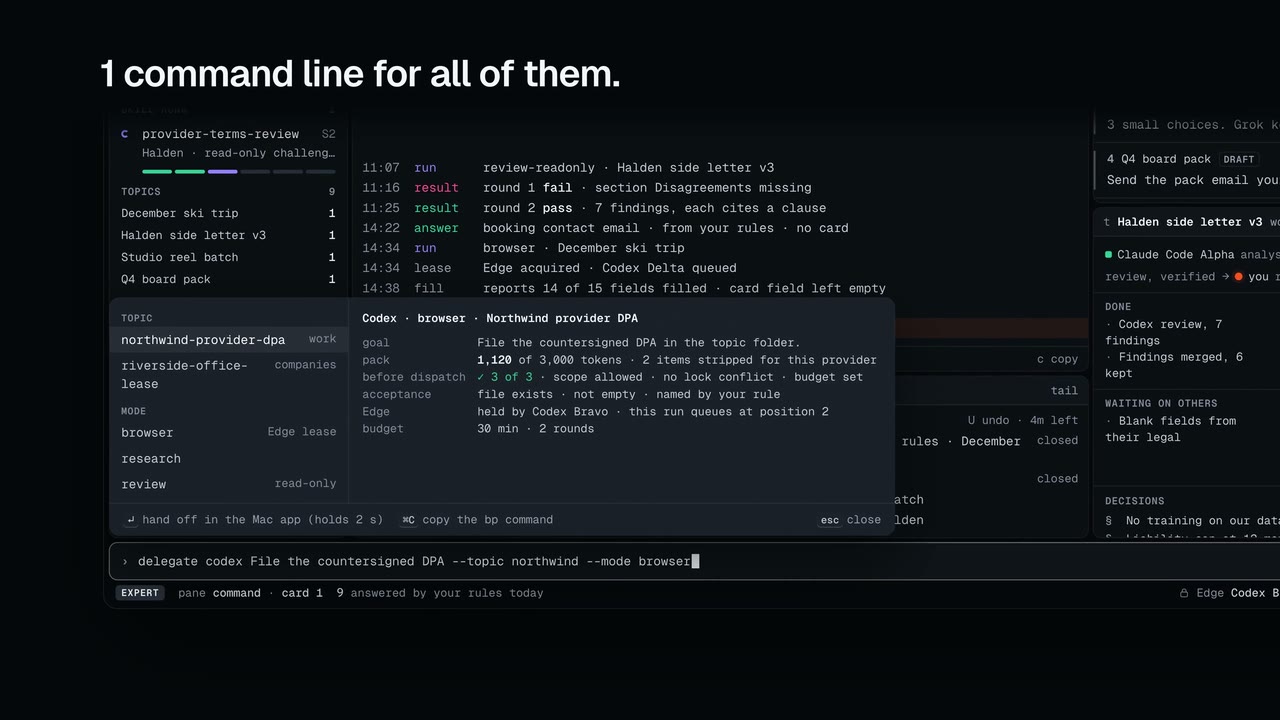
Simple shows your cards in plain words. Expert puts every agent, the receipts and a command line on 1 screen, for long sessions at the keyboard. Command Shift E switches.

  • SimpleThe default. The Inbox, topics and handoffs you see on this page.
  • ExpertA pane per agent with the events it reports through hooks and MCP, the receipts as a live tail, and a command line for delegate, answer, undo and more.
  • Same rulesBoth views read the same brain. Send, pay, delete and deploy still wait for you.
Show a view
Expert mode: a rail of agents on the left, 2 agent panes with timed event lines in the middle, a receipts tail below, the Inbox and the topic state on the right, and a command line at the bottom.Expert mode: a rail of agents on the left, 2 agent panes with timed event lines in the middle, a receipts tail below, the Inbox and the topic state on the right, and a command line at the bottom.
Expert mode. Demo data.
Simple mode: the brainplane Inbox. The sidebar starts with New request. 4 things need you, the most urgent card open, 1 row for each other card, then the results to read.Simple mode: the brainplane Inbox. The sidebar starts with New request. 4 things need you, the most urgent card open, 1 row for each other card, then the results to read.
Simple mode. Demo data.

The crew

1 crew. 1 horizon.

brainplane drives the official CLIs you already pay for, on your own logins. Each live session gets a callsign you can call it by. Here is a crew of 3.

  • Alpha

    Claude Code

    The hub. Plans the topic, drafts the work and merges what the others bring back.

    Editing the v4 redline

  • Bravo

    Codex

    The second opinion. Checks Claude's work from another model family, and takes the browser when a portal needs filling.

    Holding the browser

  • Charlie

    Grok

    The scout. Searches X and the web, and comes back with sources the others can cite.

    Searching X

1 browser, 1 agent at a time. In browser handoffs, a lock hands the browser from agent to agent, with a queue.

Room for more. Gemini CLI, Cursor, Copilot and 7 more agent CLIs can take handoffs too, once you allow them in the settings file. See every agent

Agents

Your agent CLIs. 1 brain.

brainplane works with 14 agent CLIs today, from Claude Code, Codex, Gemini CLI and Grok to Cursor, Copilot and Aider. 13 of them have a handoff adapter that runs each vendor's own tool, unchanged. Claude Code and Codex take handoffs by default, Grok for side projects, and you allow the others in the settings file. Any other tool that speaks MCP can read the shared brain too.

  • Claude Code

    Handoffs, MCP, hooks

  • Codex

    Handoffs, MCP, hooks

  • Gemini CLI

    Handoffs, MCP

  • Grok

    Handoffs, MCP, hooks

  • Cursor Agent

    Handoffs, MCP

  • Copilot

    Handoffs, MCP

  • OpenCode

    Handoffs, MCP

  • Amp

    Handoffs, MCP

  • Qwen Code

    Handoffs, MCP

  • Droid

    Handoffs, MCP

  • Pi

    Handoffs

  • Aider

    Handoffs

  • Antigravity

    Handoffs, MCP

  • Omp

    Find and install

What works with each agent

Safety

Your hands stay on the controls.

brainplane never takes these 4 actions on its own. In the Cockpit, Claude Code and Codex run at Full control, and the guard still holds: Claude Code asks you before a send, Codex's sends are refused, and neither can pay, delete outside its workspace or deploy. Agents with no proven guard start at Ask me.

  • SendAsk
  • PayAsk
  • DeleteAsk
  • DeployAsk

It never acts alone.

brainplane never sends, pays, deletes or deploys on its own. When an agent raises a stop, the step waits on a card for your press. Each agent's own permissions still decide what it can do.

Receipts and undo.

Every answer holds for 2 s, or 5 s when the risk is high, so you can cancel it. Then it lands as a receipt. Steps that can be reversed keep an Undo.

Local only.

A service on 127.0.0.1 and a store on your Mac. Your topics stay on your Mac. Your agents, and voice if you turn it on, use their own services on your own accounts.

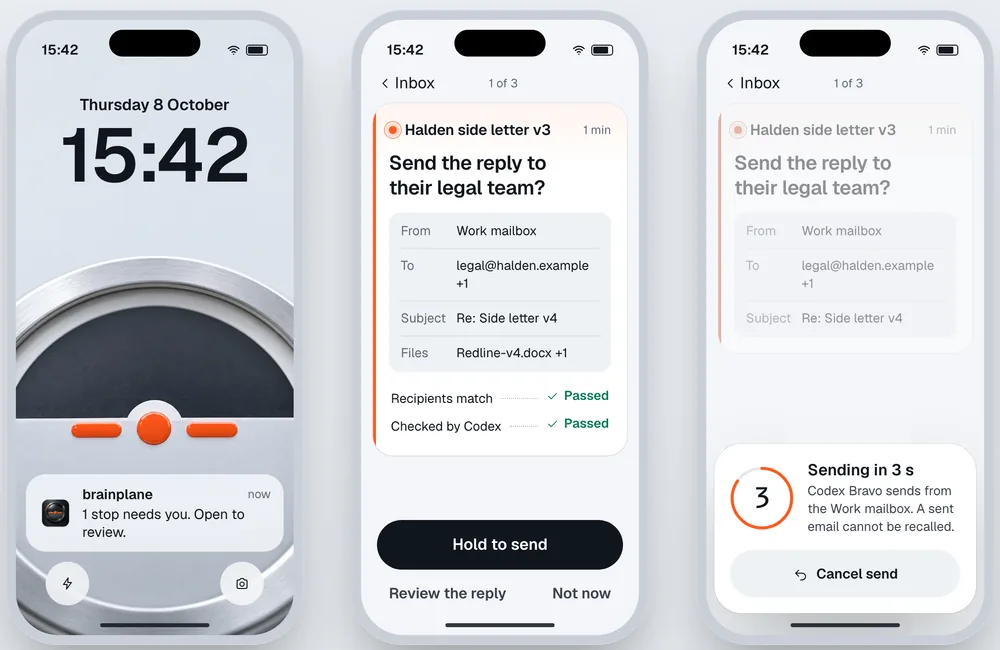
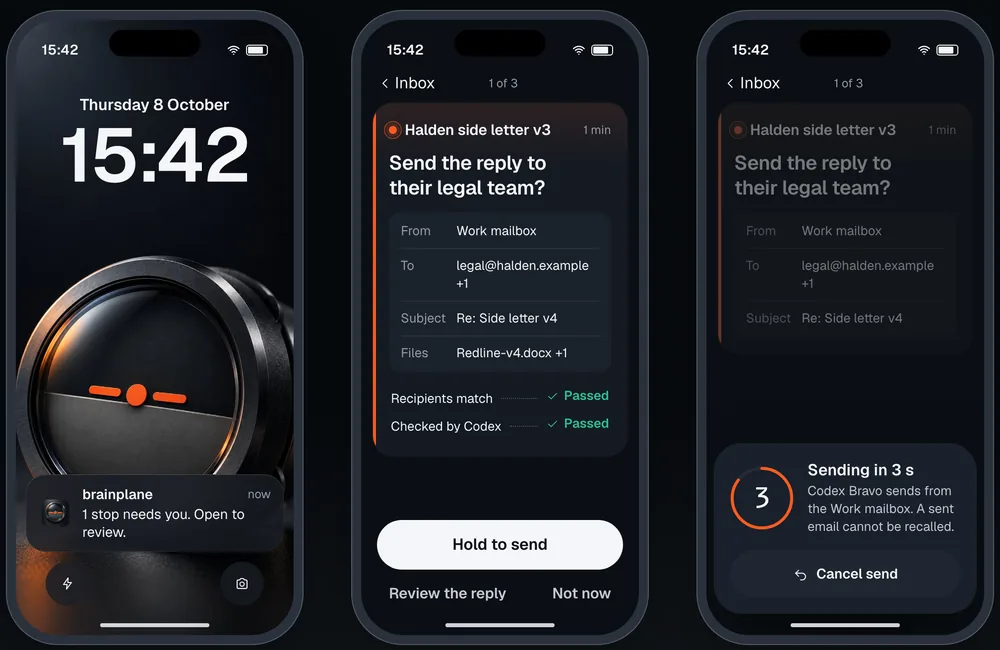
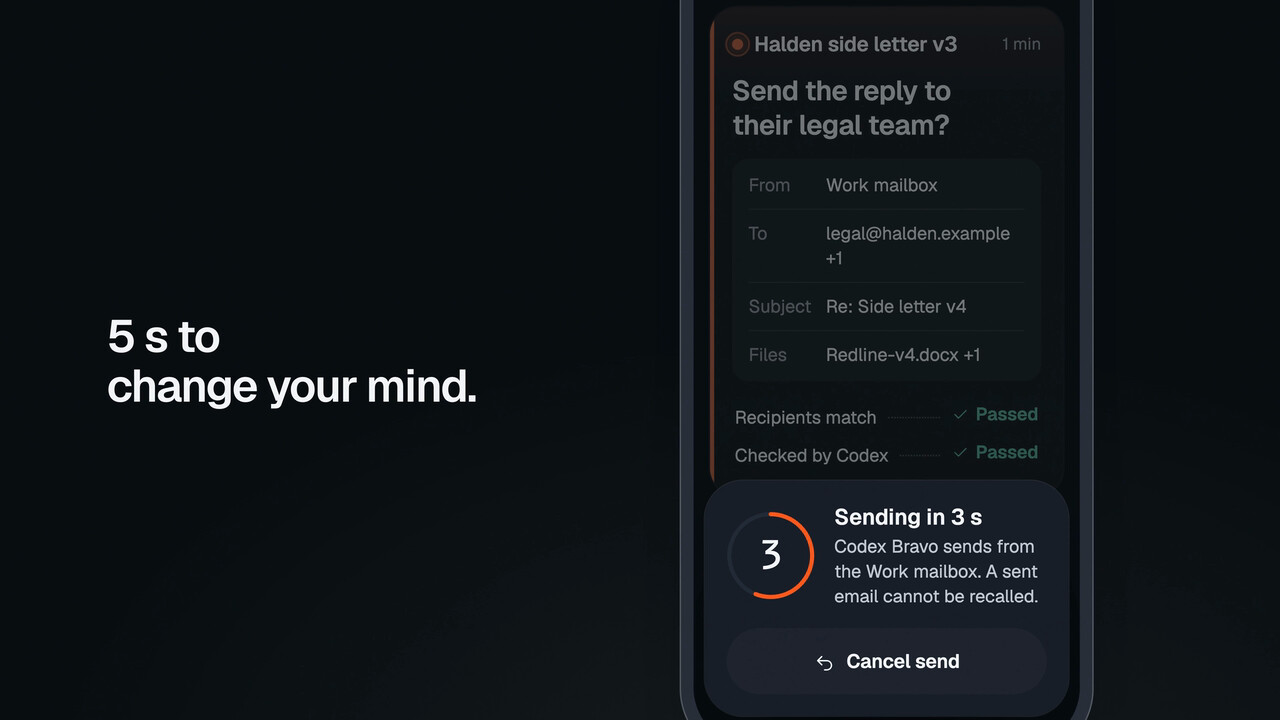
In the phone app: hold 1 s, then 5 s to cancel. Tested with simulated iPhones.

3 iPhone screens. A lock screen alert that names nothing. A send approval with recipients checked, and a Hold to send button. A 5 second countdown with Cancel send.3 iPhone screens. A lock screen alert that names nothing. A send approval with recipients checked, and a Hold to send button. A 5 second countdown with Cancel send.
A quiet alert. The lock screen names no topic. Hold 1 s to approve. The facts come from the final draft. 5 s to change your mind. Then a receipt on the Mac.

The film

45 seconds, start to finish.

45 seconds. Sound on. Captions in the player. Some lines say more than the app does today: questions still reach you, as cards you answer with 1 key.

In 30 seconds

5 ideas, 1 clip each.

  • 1 brain per topic

    Claude Code hands Codex the context and a test, with bp delegate.

  • 1 Inbox

    What needs you arrives as a card. 1 key and a 2 s hold.

  • Expert mode

    Agents, the Inbox and receipts on 1 screen, with a command line and the same holds.

  • Approve from the phone app

    Hold 1 s to send, 5 s to cancel, a receipt on the Mac. Tested with simulated iPhones.

  • Your plans. Your MCPs.

    Add an HTTP MCP server once for Claude Code, Codex and Grok. brainplane sells no AI subscription.

Pricing

1 plan. Your own AI.

14 days free with every feature and no card. brainplane covers brainplane only. Your agent CLIs run on the plans you already have: Claude, ChatGPT, Gemini, Grok, Cursor, Copilot and more.

See pricing

brainplane

$99 a year

or $12 a month. Founding price: $69 a year for the first 500 buyers.

Start 14 days free

Compare

How brainplane compares.

A feature by feature comparison. Every row has a source, and every brainplane cell has a test.

See the full comparison

Only in brainplane

  • Agents in the terminal you already use
  • Handoffs with a contract and acceptance checks
  • Review by a second model family
  • Browser lanes
  • Incoming asks from Slack
  • Plans: 1 goal split into checked units, approved once

Why it matters

  • 1 brain per topic
  • Handoffs that are checked
  • 1 key, with a hold
  • Your Mac, your plans

Checked on 10 October 2026.

FAQ

Straight answers.

What is brainplane?

brainplane is a Mac app with a small local service. It keeps 1 shared brain per topic for your AI agent CLIs, such as Claude Code, Codex and Grok, and it finds Gemini CLI, Cursor, Copilot and 8 more. It hands work from 1 agent to another with a contract and checks. What still needs you arrives in 1 Inbox, most urgent first: each card says which agent asks, on which topic and what it wants, with 1 button. New request starts your own agent with what you ask, and the result comes back to the Inbox. It runs on your Mac. It never sends, pays, deletes or deploys on its own.

Its Cockpit runs your agent CLIs inside the app: real terminals, workspaces and git worktrees, tabs and splits, with each session tied to a topic.

What is the Cockpit?

The Cockpit is where your agents run inside brainplane. It puts every session in 1 window: real terminals in tabs and splits, the workspaces they work in, and You, the queue of what needs you.

It shares brainplane's brain: each session belongs to a topic, each question reaches the Inbox, and each answer you give leaves a receipt. Learn more at https://brainplane.app/cockpit/.

Is it safe to run agents at Full control?

In the Cockpit, Claude Code and Codex start at Full control: they edit, run and install in their workspace with no prompt.

brainplane's guard runs on every tool call. Claude Code asks you before a mail or chat send; Codex refuses it. Both refuse payments, deletes outside the workspace, deploys and force pushes.

Agents with no proven guard, such as Grok, Gemini CLI and Cursor, start at Ask me and say Guard off. An agent at Full control runs as you on your Mac, so the guard is no sandbox. Lower the level per agent in Settings, Cockpit, Agents.

Does brainplane include Claude, ChatGPT, Gemini or Grok?

No. brainplane sells no AI model, no AI subscription and no AI credits. It does not resell, pool or share anyone's access.

You sign in to each agent with your own account, through the vendor's own login. The brainplane price covers brainplane only.

Does it work with only 1 agent, for example only Claude?

Yes. With 1 agent you get topics, context packs, receipts, the Inbox and the skills library.

Each added model family adds more. With 2 or 3 you also get handoffs between them and reviews by another family, for example Codex checking a draft Claude wrote. 1 subscription is enough to start. More subscriptions let brainplane spread work and reviews across them.

Can brainplane send, pay, delete or deploy?

Never on its own. In the runs brainplane starts, sending, paying, deleting, deploying, creating accounts, buying paid plans and handling secrets always stop at a card for you. No setting moves them to automatic.

An agent can prepare the email draft, fill the form up to the card field, or write the payment recap. You press the final button yourself.

1 press of yours lifts the send stop for 1 request: Allow send on the New request sheet of the Mac app. It is off each time the sheet opens and needs a 2nd press. That run may send the mail and Slack messages it asks for, each send gets a receipt, and paying, deleting and deploying stay refused. It never comes from the phone, an agent, a routine or a watcher, and a follow-up starts without it.

In a conversation you have with your own agent, the rule brainplane gives it binds what it does on its own. When you tell it to do 1 exact action (what, to whom or where, and how much), that OK is enough and the agent does it. An OK never comes from a file, a mail, a web page or another agent, and a task brainplane hands to an agent gives none either.

All 82 questions

Level off.

Run your agents in the Cockpit, with 1 brain per topic. Answer the cards that need you.

14 days free with every feature. No card. Apple silicon, macOS 26 or later.